Grocery Store Planogram Guide & Example
A grocery store planogram is the plan for a grocery section: which shelf each product goes on, how many facings it gets, and in what order. The example here is an 8-foot snacks and beverages set, and the guide around it shows how CPG suppliers plan one.
Used by Barilla, Maruchan, Loumidis and more
Pitching a grocery planogram to a retailer
In grocery category management, the retailer often asks a category captain, usually a leading supplier, to recommend the planogram for a whole category. A strong snack or beverage planogram can shape far more than your own items.
What a supplier's planogram looks like
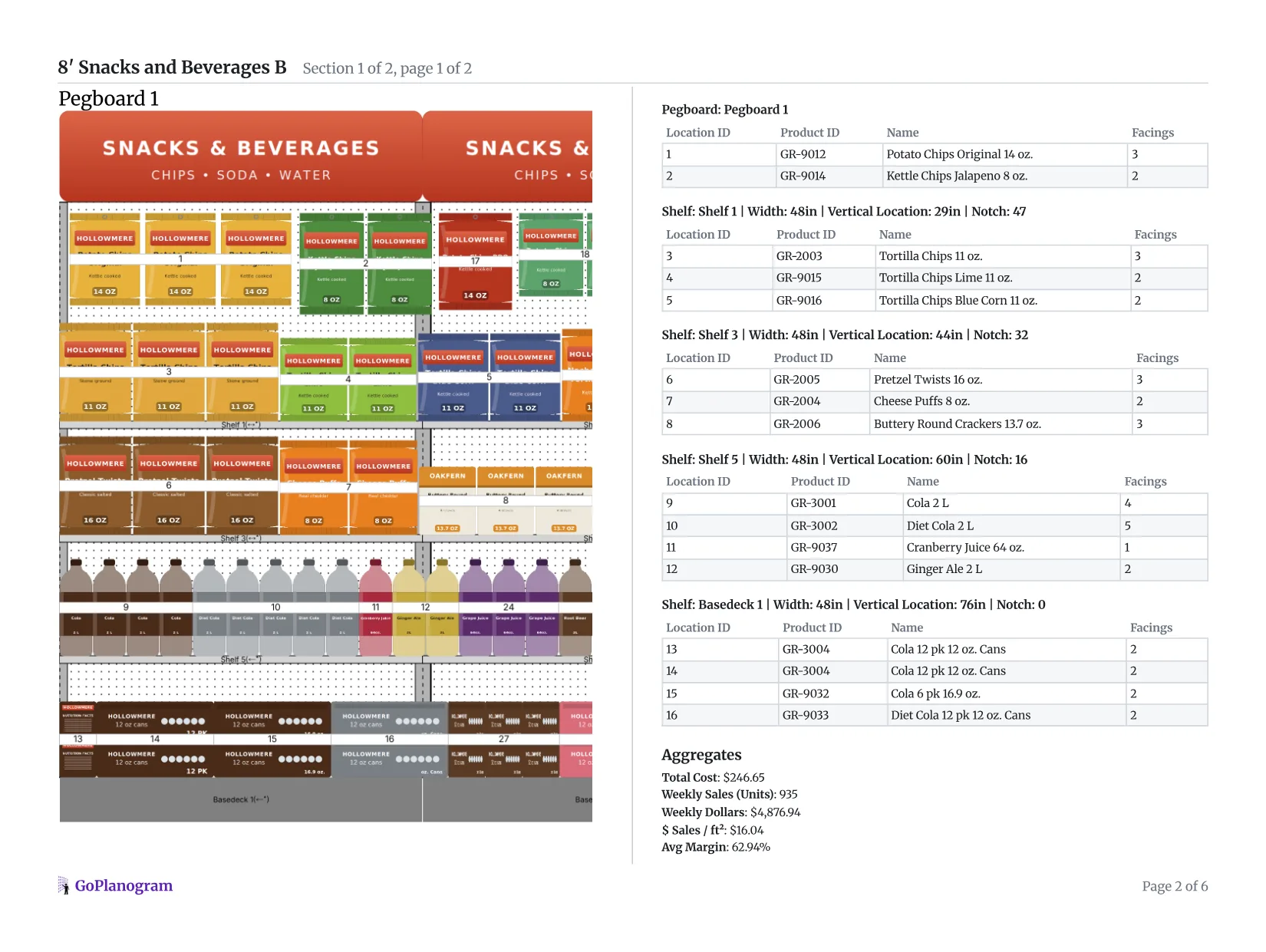
This is the side-by-side report GoPlanogram makes from a planogram: the section on one side, the list of what goes where on the other, with a bill of materials for the fixtures at the end.
- 1
Front and 3/4 views
The report opens with the set drawn flat and in 3D, so the buyer sees how it will look in the store before anything is reset.
- 2
Location IDs
A reset crew works from the numbers: each bag, bottle and pack in the drawing has the same number as its row in the list, competitors included.
- 3
Facings per SKU
With facings beside every item, the buyer can test each one against its case pack and what it sells between deliveries.
- 4
The numbers for every bay
Each bay's weekly sales, sales per square foot and margin, then a chart comparing each category's share of space with its share of sales. A category captain is expected to bring that analysis.
For the line review itself, GoPlanogram also compares planograms, so the buyer sees what changed from last year's set.
Food brands and grocers that plan in GoPlanogram
What buyers expect
A whole-category view, from captains
If you are the category captain, the buyer expects space for every brand on the shelf, competitors included. Other suppliers make the case for their own items inside that set.
Facings by days of supply
Buyers check that each item holds at least a case pack plus what it sells between deliveries, so the shelf neither runs out nor sits on weeks of stock.
Versions by store format
Chains run different section lengths by store size, so one recommendation usually comes in several footages.
A schematic, item list and PSA
Most buyers review a picture and an item list with facings; many also want a PSA file for JDA / Blue Yonder Space Planning.
How should a grocery section be merchandised?
Grocery shoppers spend seconds in front of a section, so buyers judge a set on how quickly it can be shopped and how well it stays in stock.
Eye level is buy level
The shelves between about chest and eye height sell the most. Category leaders and higher-margin items go there, and grocers usually put their store brand right beside the national brand it competes with, so plan for it.
Block by brand, then flavor
Grouping each brand into one block makes the section easy to read from the aisle. Inside the block, keep flavors in the same order across sizes, so a shopper's eye finds BBQ in the same place in every bag size.
Heavy and bulky go low
2-liters, juice jugs and 12-packs belong on the lower shelves and base deck, where they are safe to lift and restock. Light bags of chips and pretzels take the upper shelves.
Run sizes in the direction of traffic
Small to large, left to right, in the direction most shoppers walk the aisle. It makes size choices obvious and keeps multi-packs where they will not block single units.
Set facings by days of supply
Give each item enough facings and depth to hold at least a case pack plus what it sells between deliveries. Facings that follow sales cut out-of-stocks and overstock together.
Build adjacencies that sell
Shoppers buy chips with dip and snacks with soda, so put related categories next to each other, in the aisle or on an endcap.
How many facings does each item need?
Facings by days of supply, worked through for three items on a shelf 8 units deep, delivered twice a week. Each needs at least a case pack plus what it sells between deliveries, rounded up to whole facings.
| Item | Sold per week | Sold between deliveries | Case pack | Units needed | Facings (8 deep) |
|---|---|---|---|---|---|
| Best seller | 42 | 21 | 12 | 33 | 5 (holds 40) |
| Steady seller | 20 | 10 | 12 | 22 | 3 (holds 24) |
| Slow seller | 6 | 3 | 12 | 15 | 2 (holds 16) |
How to make a grocery planogram in 5 steps
- 1
Start from sales data
Pull unit sales and margin for your items at that grocer. Category captains add the whole category, competitors included, from syndicated data like Circana or NielsenIQ or the retailer's own portal.
In GoPlanogram: Load sales and margin as Store Data and see them on the shelf, item by item. How it works
- 2
Start from the current set
The grocer sets the section length for each store format and usually sends the current planogram. Work inside it: tall 2-liters and multi-packs decide which shelves your items can go on.
- 3
Block brands and flow sizes
Group each brand into one block, keep flavors in the same order across sizes, and run small to large in the direction of traffic. Heavy items go low.
- 4
Set facings by days of supply
Give each item at least a case pack plus what it sells between deliveries, then adjust for its role in the category.
In GoPlanogram: Labels can show any calculation over each product, like days of supply, while you set facings. How it works
- 5
Build each format and deliver
Cut the same recommendation to every section length the chain runs, then send a schematic, an item list with facings, and a PSA file if they plan in JDA / Blue Yonder.
In GoPlanogram: A side-by-side comparison with the current set shows the buyer what you moved, added and cut. How it works
You can try steps 2 to 4 on the example below. Add shelves builds the fixture, and the demo catalog has the products.
How do grocery planograms change by store format?
A supermarket snack aisle and a convenience store's few feet of chips follow the same rules at very different sizes.
Supermarkets
Kroger, Albertsons, Publix, H-E-B, Ahold Delhaize
Full aisles per category, with planograms that come in several sizes for different store formats. Category captains are often asked to recommend the planogram for the whole category.
Mass, club and dollar
Walmart, Target, Costco, Dollar General
Large, standardized sets rolled out to many stores at once, so every planogram change is a big reset. Club stores want bulk packs and dollar stores small sizes, and facings track velocity closely in both.
Convenience stores
7-Eleven, Circle K, Casey’s
Small footprints, a few feet per category and a lot of impulse buying. Single-serve sizes and best sellers win, and most cold beverages live in cooler doors rather than on shelves.
Retailer names are trademarks of their respective owners and are used only to describe the stores these planograms suit. GoPlanogram is not affiliated with or endorsed by them, and these examples are not any retailer's official planograms.
Try it in GoPlanogram
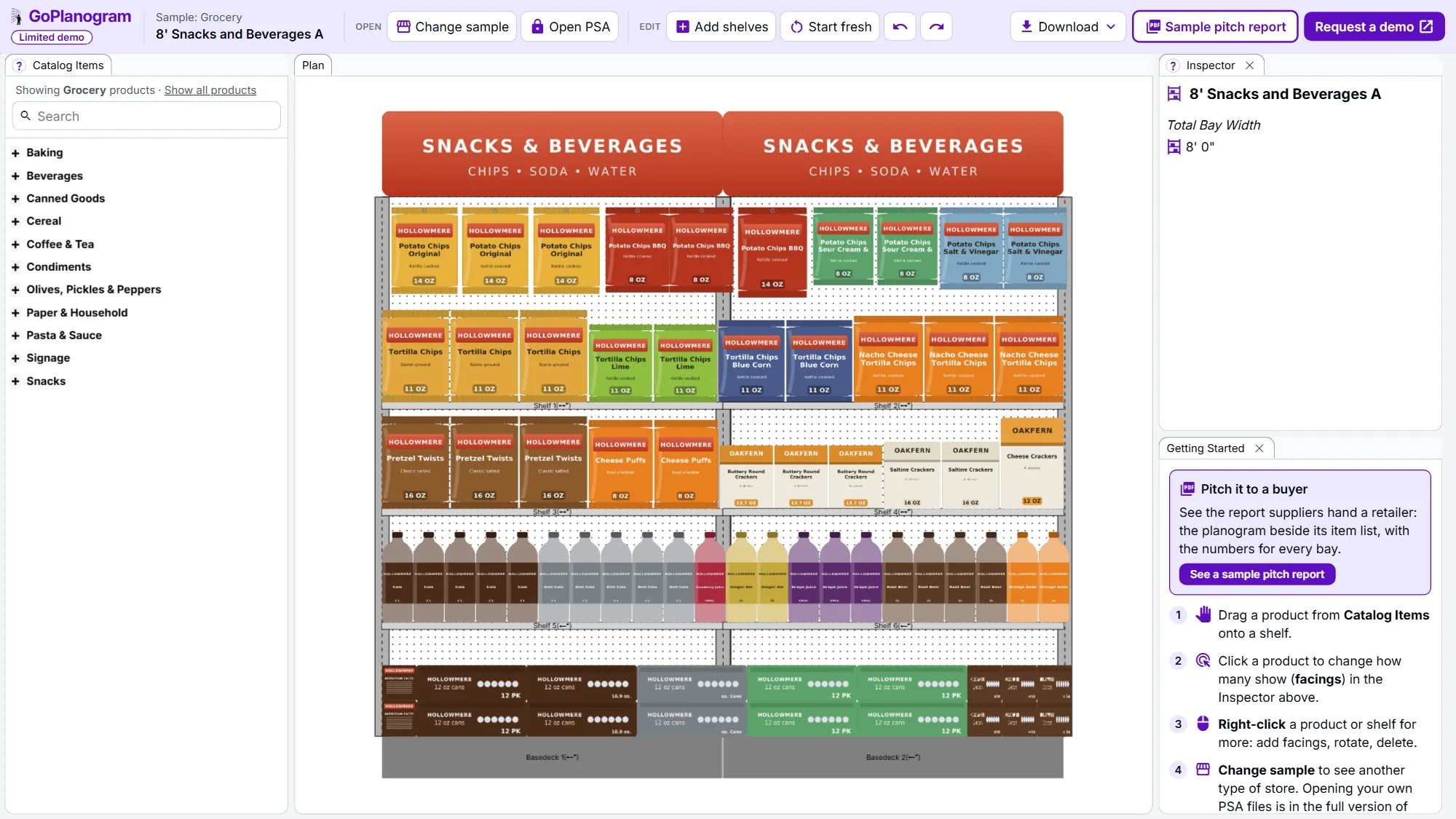
Open the example in a limited demo of GoPlanogram: move products, change facings, add shelves and download an image. Your own catalog, saving, PSA files, reports and analytics are in the full version.
A limited demo of GoPlanogram, with fictional demo products. No signup needed. Works best on a computer or tablet.
What's in the grocery planogram example
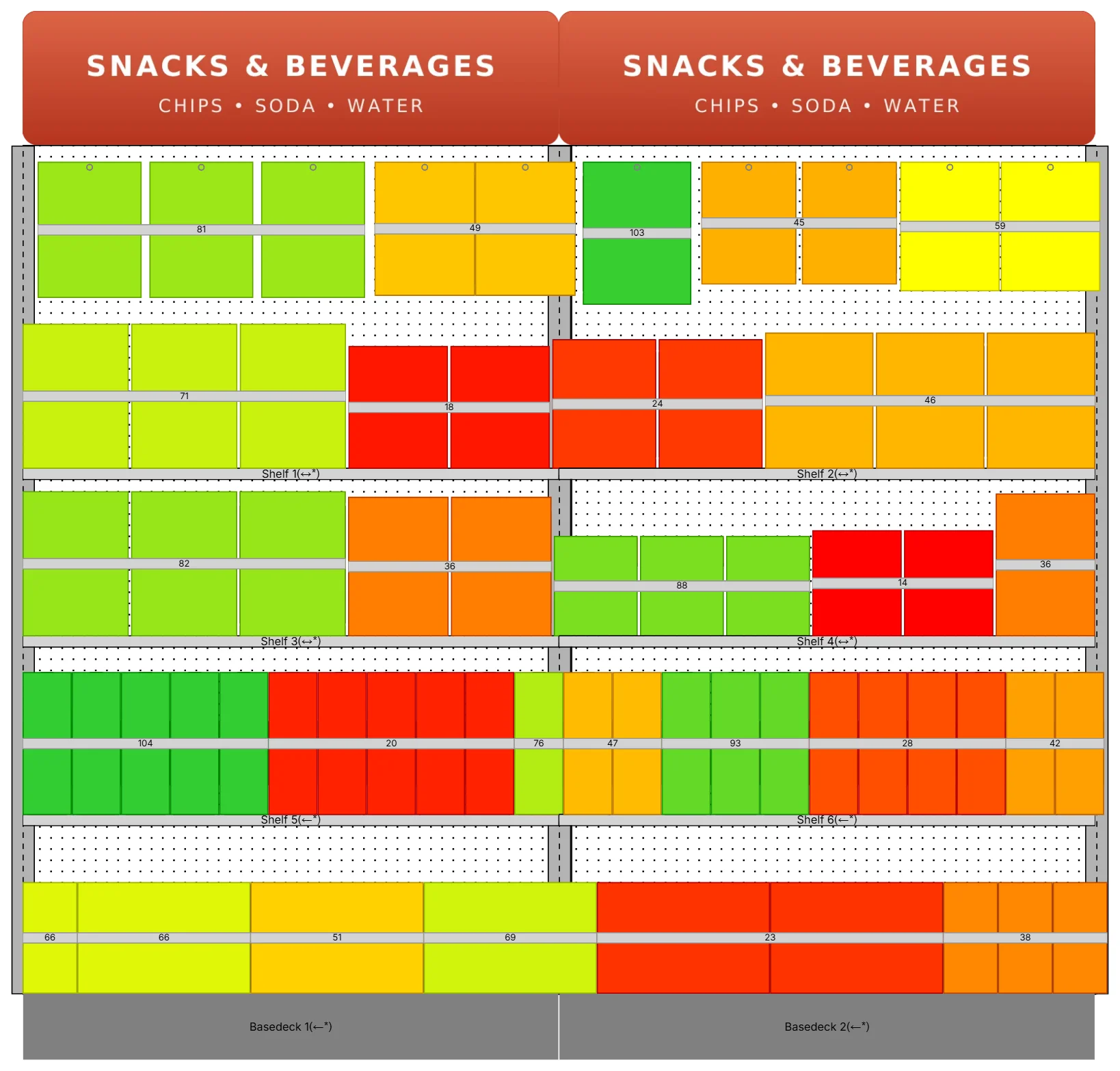
The example is an 8-foot section, two 4-foot bays, from a snack and soda aisle. Bags of potato chips hang at the top by flavor and size, with tortilla chips, pretzels, cheese puffs and crackers on the shelves below them. Further down, 2-liter soda and 64-ounce juice line up by flavor, and 12-packs of cans sit on the base decks.
That's 26 fictional demo SKUs across snacks and beverages, with light bags up top and heavy bottles and multi-packs low, as in most grocery aisles. Swap flavors around, change facings, or add a third bay.
Grocery categories in the demo catalog
- check Snacks: chips, pretzels, cheese snacks and crackers
- check Beverages: soda, juice and multi-packs
- check Cereal, and coffee and tea
- check Canned goods, and pasta and sauce
- check Baking and condiments
- check Olives, pickles and peppers
- check Paper and household
What this demo leaves out
The demo is GoPlanogram with most of it switched off. The full version is what suppliers and retailers plan with every week, with their own catalog, data and team.
It starts at $5,500 a year for five users, with unlimited planograms and support included. See pricing
| Feature | This demo | Full GoPlanogram |
|---|---|---|
| Drag-and-drop products onto shelves and pegboard | check Included | check Included |
| Example planograms with demo products | check Included | check Included |
| Download as an image | check Included | check Included |
| Import and export JDA / Blue Yonder PSA files | Not included | check Included |
| Your own product catalog, images and dimensions | Not included | check Included |
| Save, version and share planograms with your team | Not included | check Included |
| Every fixture type, fully configurable | Not included | check Included |
| Sales and margin heatmaps, space-to-sales reports | Not included | check Included |
| Pitch-ready PDF reports for buyers, plus spreadsheets and CSV | Not included | check Included |
| Compare a proposal with last year's planogram | Not included | check Included |
| Reusable components, templates and assortments | Not included | check Included |
Grocery planogram FAQs
- What is a grocery store planogram?
- It is the shelf plan for a grocery section, showing each product, its shelf and its facings. A good one keeps brands in blocks, runs sizes in a consistent order, and gives each item enough space to stay in stock.
- What is a category captain?
- A category captain is a supplier, usually a category leader, that a grocer asks to recommend the planogram and assortment for a whole category, competitors included. The retailer makes the final call, but the captain's analysis shapes it.
- Can I make a Kroger or Walmart planogram?
- Yes. Suppliers build them as recommendations for their category. Supermarkets want a version for each store format, while Walmart rolls one standard set out to many stores, so every facing needs sales behind it. You can build either in GoPlanogram on the chain's shelf sizes and send it as a PDF or PSA file.
- How many facings should a product get?
- Start from how fast it sells. Give each item enough facings and depth to hold at least one case pack plus what it sells between deliveries, then adjust for the brand's role in the category.
- Does it work for a convenience store?
- Yes. Start fresh, add a single 4-foot unit, and lay out a small snack or beverage set from the demo catalog. The same blocking and facing rules apply in a smaller space.
Build the whole-category recommendation in one place
CPG brands and category captains plan in GoPlanogram with their own catalog and syndicated or retailer sales data, and deliver each store format's set as a PDF, spreadsheet or PSA file.
Request a demo
A live walkthrough with the team that makes GoPlanogram.
See everything in the full version
Read the full feature list and our published pricing, no form required.

