Hardware Store Planogram Guide & Example
A hardware store planogram is the shelf-by-shelf plan for a hardware section: which hook or shelf each product goes on, how many facings it gets, and in what order. This guide covers the rules suppliers plan to and the steps they follow, and the 4-foot fastener section below is yours to open and rearrange.
Used by Spectrum Brands – National Hardware, The Hillman Group, Channellock and more
Pitching a hardware planogram to a retailer
For a supplier, the planogram is also the proposal. Home centers and hardware chains expect vendors to show how their line should be merchandised, often at an annual line review.
What a supplier's planogram looks like
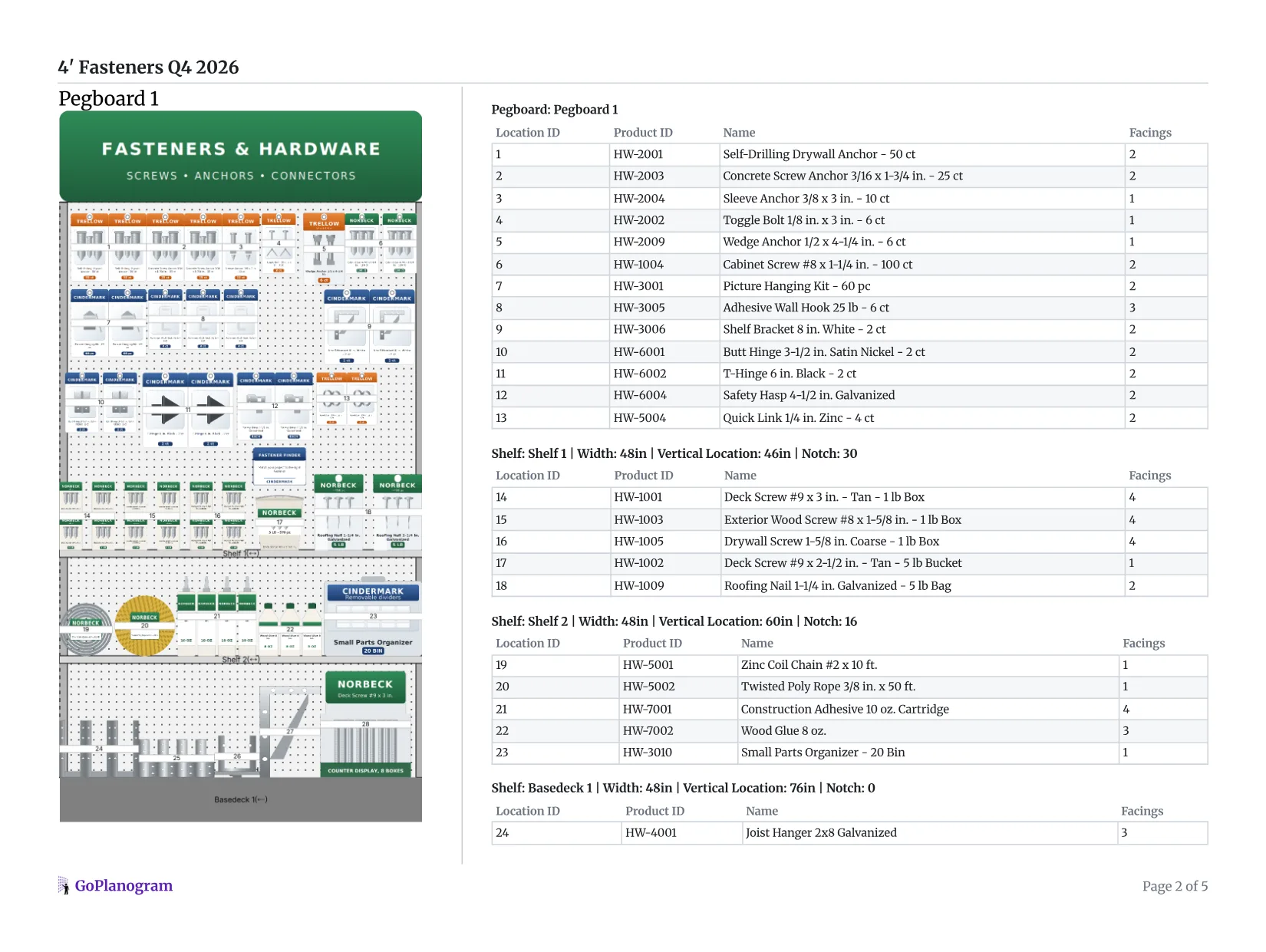
This is the side-by-side report GoPlanogram makes from a planogram: the section on one side, the list of what goes where on the other, with a bill of materials for the fixtures at the end.
- 1
Front and 3/4 views
The report opens with the set drawn flat and in 3D, so the buyer sees how it will look in the store before anything is reset.
- 2
Location IDs
Every hook and shelf position is numbered to match its row in the list, so a store team can hang the section without guessing which anchor goes on which hook.
- 3
Facings per SKU
Each anchor, screw and hinge with its facings, so the buyer sees how much pegboard and shelf you're asking for.
- 4
The numbers for every section
Weekly sales, sales per square foot and margin under each 4-foot section's list, then a chart of each category's share of space against its share of sales. That chart is your case for the space at a line review.
For the line review itself, GoPlanogram also compares planograms, so the buyer sees what changed from last year's set.
Hardware and tool brands that plan in GoPlanogram
“[GoPlanogram's] cloud-based model enables superior collaboration and dramatically improves best practice sharing... it strengthens our ability to optimize local planograms for our customers.”

“The GoPlanogram application is intuitive, allows for user flexibility and the perfect solution to manage our complex product line. Their agile approach to requirements development and category management helped us design a Best-in-Class space planning tool.”

“Channellock uses GoPlanogram to communicate colorful planograms to customers that do not have their own design capabilities. GoPlanogram is nimble and easy to use. The graphics are very clear and colorful.”



What buyers expect
A schematic at the retailer's size
The section drawn at their fixture, usually in 4-foot sections, with every hook and shelf position shown.
A SKU and facing list
Each item with its position, facings and hook or shelf, so the store team can set it and the buyer can weigh space against sales.
A version for each footage
Independent and co-op stores rarely share one size, so expect to show the same assortment at 4, 8 and 12 feet.
A PSA file
Larger chains often plan in JDA / Blue Yonder Space Planning and ask suppliers for a PSA file they can load straight into their own planograms.
How should a hardware section be organized?
Hardware sections carry thousands of small, similar SKUs. These are the rules buyers and store teams expect a fastener aisle or pegboard wall to follow.
Pegboard for packs, shelves for bulk
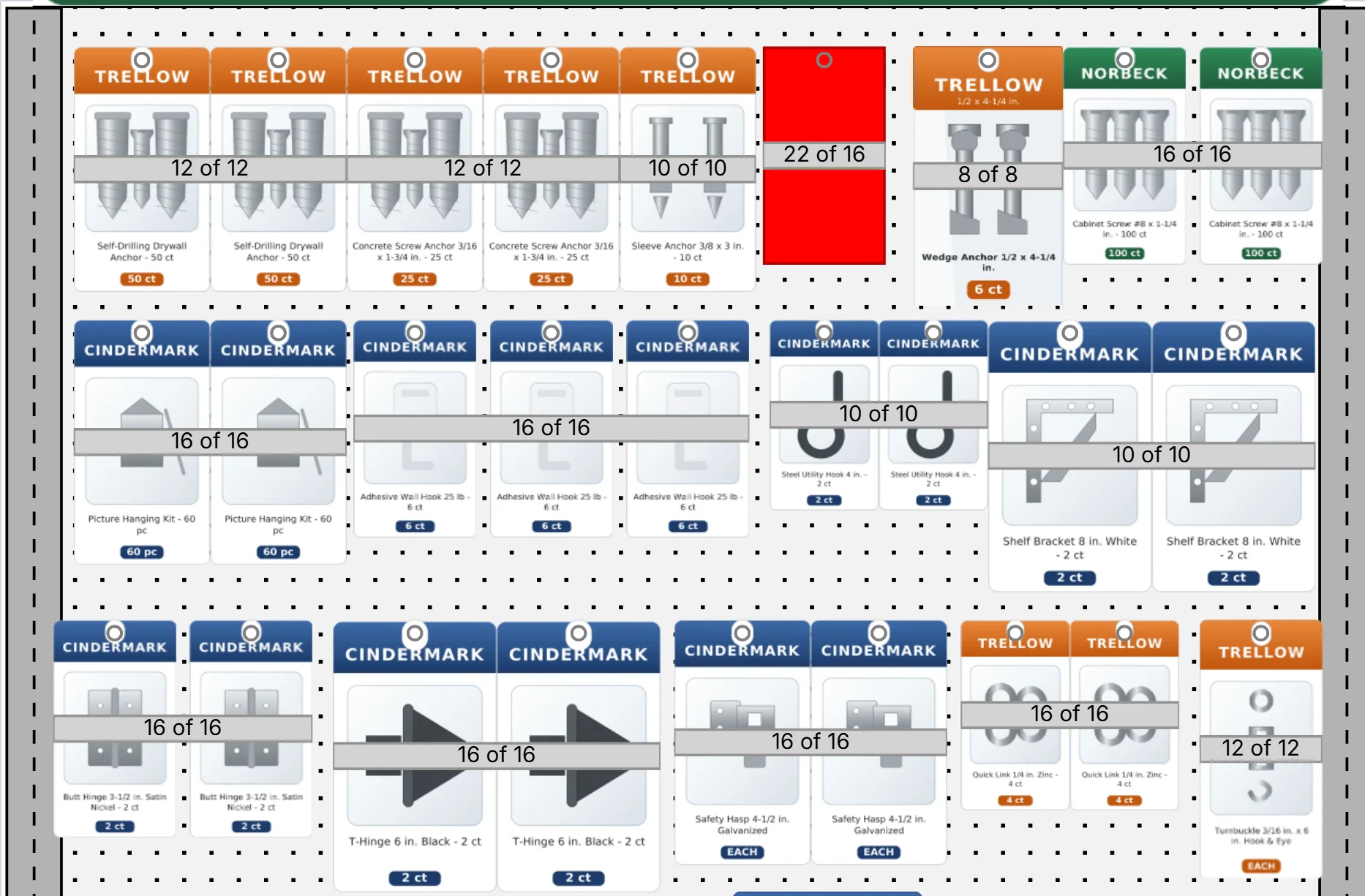
Blister packs, carded hooks, hinges and small-count anchors hang on peg hooks, where they stay visible and faced. Boxes by the pound, buckets, bags of nails and cartridges belong on shelves, with the heaviest items on the base deck.
Block by category, then by job
Shoppers come to the fastener aisle with a job in mind. Keep each category together (anchors, wood screws, nails, structural connectors), then order within it by use: drywall anchors before masonry and concrete anchors, interior screws before deck and exterior screws.
Run sizes in one direction
Within a product line, step from smallest to largest, left to right and top to bottom. A consistent size flow lets a shopper find a 1-5/8 in. screw by scanning across instead of reading every label.
Give eye level to margin and impulse
The band between about 48 and 60 inches sees the most attention. Put higher-margin kits, assortments and add-on items there, and keep low-margin commodity fasteners above and below where shoppers will look for them anyway.
Size facings to velocity
Give best sellers enough facings, or enough hook depth, to last between deliveries. Take the room from slow movers, which can usually get by on one facing.
Label every hook
Peg hooks with scan plates or label holders keep prices and SKUs at the product, which makes re-sets and audits faster and stops shoppers from guessing which hook a pack came from.
Which fixture does each hardware product go on?
A starting point for splitting a section between pegboard and shelves. The retailer's fixture and your sales decide the rest.
| Product | Fixture | Where on the section |
|---|---|---|
| Blister packs and carded items | Peg hooks | Upper and middle board, smallest packs highest |
| Small-count anchors, hinges and hasps | Peg hooks | Middle of the board, blocked by job |
| Kits and assortments | Peg hooks or shelf | Eye level, about 48 to 60 in. |
| Boxed screws and nails | Shelves | Below the pegboard, sizes running small to large |
| Adhesive and sealant cartridges | Shelves | Middle shelves, blocked by type |
| Structural connectors | Shelves | Lower shelves, by connector type |
| Bulk boxes, buckets and bagged nails | Base deck | Bottom of the section, heaviest items |
How to make a hardware planogram in 5 steps
- 1
Start from the space you are given
The buyer sets it: so many 4-foot sections, how much is pegboard, how many shelves, often sent as the current planogram. Work inside it, and if you want more, bring the sales that justify it.
In GoPlanogram: Import the retailer's current planogram straight from their PSA file and start from that. How it works
- 2
Fit your line to the fixture
Within the retailer's pegboard and shelf split, put packs, carded items and small-count hardware on hooks, and boxed and bagged fasteners on shelves, heaviest on the base deck.
In GoPlanogram: Pegboard, hooks and shelves are all configurable, down to hook length and spacing, so the plan matches their fixture. How it works
- 3
Block by category, then by job
Lay categories out in the order shoppers work (anchors, screws, nails, connectors), then run each line small to large, left to right.
- 4
Set facings from sales
Give each SKU enough facings or hook depth to last between deliveries, and put kits and higher-margin items in the eye-level band.
- 5
Build each footage and deliver
Make 4, 8 and 12-foot versions from the same assortment for the store sizes the retailer runs, then send a schematic, a SKU and facing list, and a PSA file if they plan in JDA / Blue Yonder.
In GoPlanogram: The schematic, the SKU and facing list, and the PSA file for each footage all come out of the same plan. How it works
You can try steps 2 to 4 on the example below. Add shelves builds the fixture, and the demo catalog has the products.
How do hardware planograms differ by retailer?
A fastener section for a home center isn't laid out like one for a farm store or a neighborhood hardware store, even when the SKUs are the same.
Home centers
The Home Depot, Lowe's, Menards
Long runs of 4-foot sections and deep assortments, where one category can span a whole aisle. Suppliers are often asked to propose the planogram for their category at a line review.
Farm and ranch stores
Tractor Supply, Rural King
Hardware sits beside fencing, farm and outdoor goods, so chain, rope, gate hardware and bulk fasteners carry more weight. Expect more shelf and less pegboard than a home center.
Independent and co-op hardware
Ace Hardware, True Value, Do it Best
Smaller footprints that vary from store to store, so one category plan usually has to come in several sizes, such as 4, 8 and 12 feet, from the same assortment.
Retailer names are trademarks of their respective owners and are used only to describe the stores these planograms suit. GoPlanogram is not affiliated with or endorsed by them, and these examples are not any retailer's official planograms.
Try it in GoPlanogram
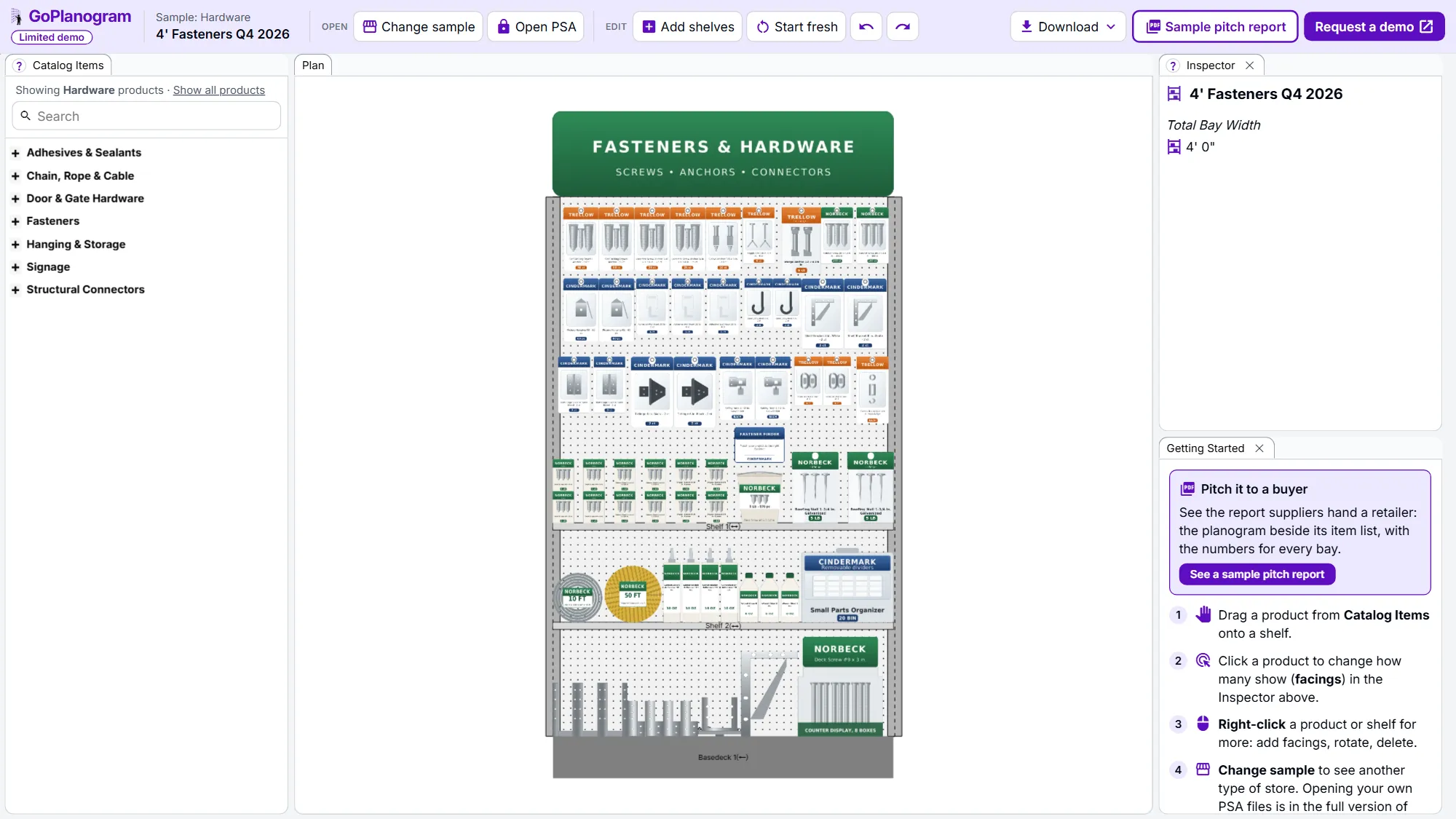
Open the example in a limited demo of GoPlanogram: move products, change facings, add shelves and download an image. Your own catalog, saving, PSA files, reports and analytics are in the full version.
A limited demo of GoPlanogram, with fictional demo products. No signup needed. Works best on a computer or tablet.
What's in the hardware planogram example
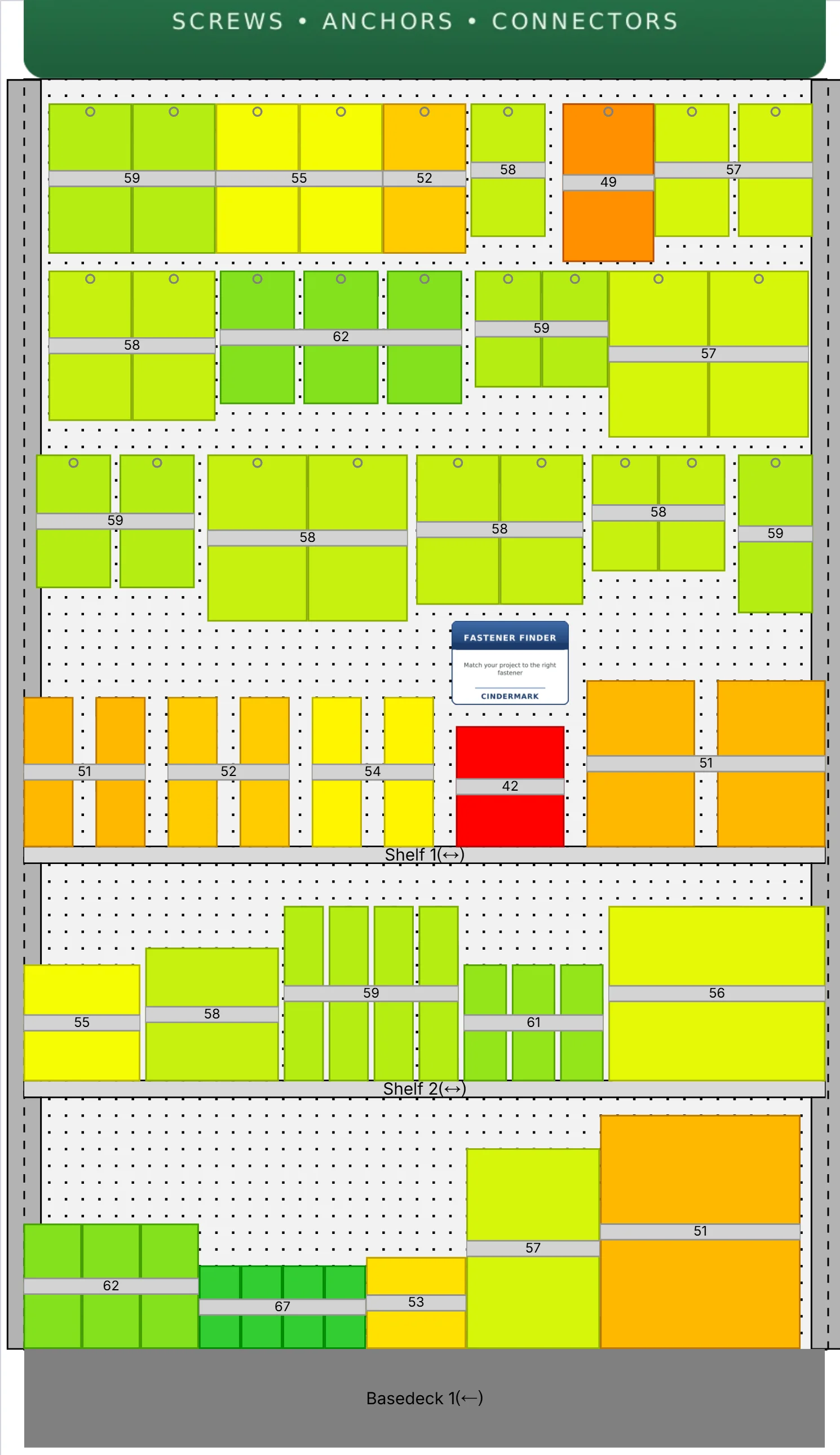
The example is a 4-foot fastener section, the kind found at the end of a hardware or home improvement aisle. A 76-inch pegboard carries packaged anchors, utility hooks, picture-hanging kits, hinges, hasps and chain hardware. Below it, a base deck and two shelves hold boxed wood screws, drywall screws, bagged roofing nails, construction adhesive, wood glue, joist hangers and post bases.
That's 29 fictional demo SKUs across six categories, set up like a working hardware section with packs on hooks, bulk on shelves and the heaviest boxes at the bottom. Move things around, add a section, or clear the fixture and start over.
Hardware categories in the demo catalog
- check Fasteners: screws, nails, bolts and nuts
- check Anchors: drywall, toggle, sleeve and wedge
- check Hanging and storage: hooks, brackets and organizers
- check Door and gate hardware: hinges, hasps and latches
- check Chain, rope and cable
- check Adhesives and sealants
- check Structural connectors: joist hangers, ties and post bases
- check Hand tools, measuring tools and power tool accessories
What this demo leaves out
The demo is GoPlanogram with most of it switched off. The full version is what suppliers and retailers plan with every week, with their own catalog, data and team.
It starts at $5,500 a year for five users, with unlimited planograms and support included. See pricing
| Feature | This demo | Full GoPlanogram |
|---|---|---|
| Drag-and-drop products onto shelves and pegboard | check Included | check Included |
| Example planograms with demo products | check Included | check Included |
| Download as an image | check Included | check Included |
| Import and export JDA / Blue Yonder PSA files | Not included | check Included |
| Your own product catalog, images and dimensions | Not included | check Included |
| Save, version and share planograms with your team | Not included | check Included |
| Every fixture type, fully configurable | Not included | check Included |
| Sales and margin heatmaps, space-to-sales reports | Not included | check Included |
| Pitch-ready PDF reports for buyers, plus spreadsheets and CSV | Not included | check Included |
| Compare a proposal with last year's planogram | Not included | check Included |
| Reusable components, templates and assortments | Not included | check Included |
Hardware planogram FAQs
- What is a hardware store planogram?
- It's a drawing of a hardware fixture with every product placed on it, down to the hook or shelf and the number of facings. Most hardware sections mix pegboard for packaged items with shelves for bulk, so the plan covers both.
- What do home centers expect in a supplier planogram?
- Usually a schematic at their section size, a SKU list with positions, facings and hook or shelf assignments, and often a PSA file. Many also want sales data behind the space you ask for. The retailer's supplier portal or your buyer will have the exact format.
- Can I make a Home Depot, Lowe's or Ace Hardware planogram?
- Yes, as a proposal for your category. Home centers run long rows of 4-foot sections, while Ace and other co-op stores need the same assortment at several footages. In GoPlanogram every shelf, pegboard and hook is configurable to the retailer's equipment, and the plan goes out as a PDF or as a PSA file for chains that plan in JDA / Blue Yonder.
- How do I plan a pegboard section?
- Start a pegboard planogram with the hook layout: hook length decides how many packs a facing holds, and hook spacing decides how many facings fit across. Hang the lightest, smallest packs highest, keep each product line together, and leave a little clearance between rows so packs do not overlap.
- Does it work for tools and other hardware departments?
- Yes. Open the hand and power tools example on this page, or start fresh and build any hardware section from the demo catalog.
Bring your next hardware line review to a demo
Hardware suppliers and retailers build their fastener and tool sets in GoPlanogram, one version per retailer and footage, from their own catalog and sales. Plans go out as PDFs, spreadsheets or PSA files.
Request a demo
A live walkthrough with the team that makes GoPlanogram.
See everything in the full version
Read the full feature list and our published pricing, no form required.

